
Ending a session & collecting payment
Read the bill, apply a discount, record how the customer paid.
Press End
On the running card, hover to reveal the buttons and press the red End. From the Active Sessions list, the same thing is called End Session.
Nothing has been charged yet. Rank works out the bill and shows it to you first.
Read the bill
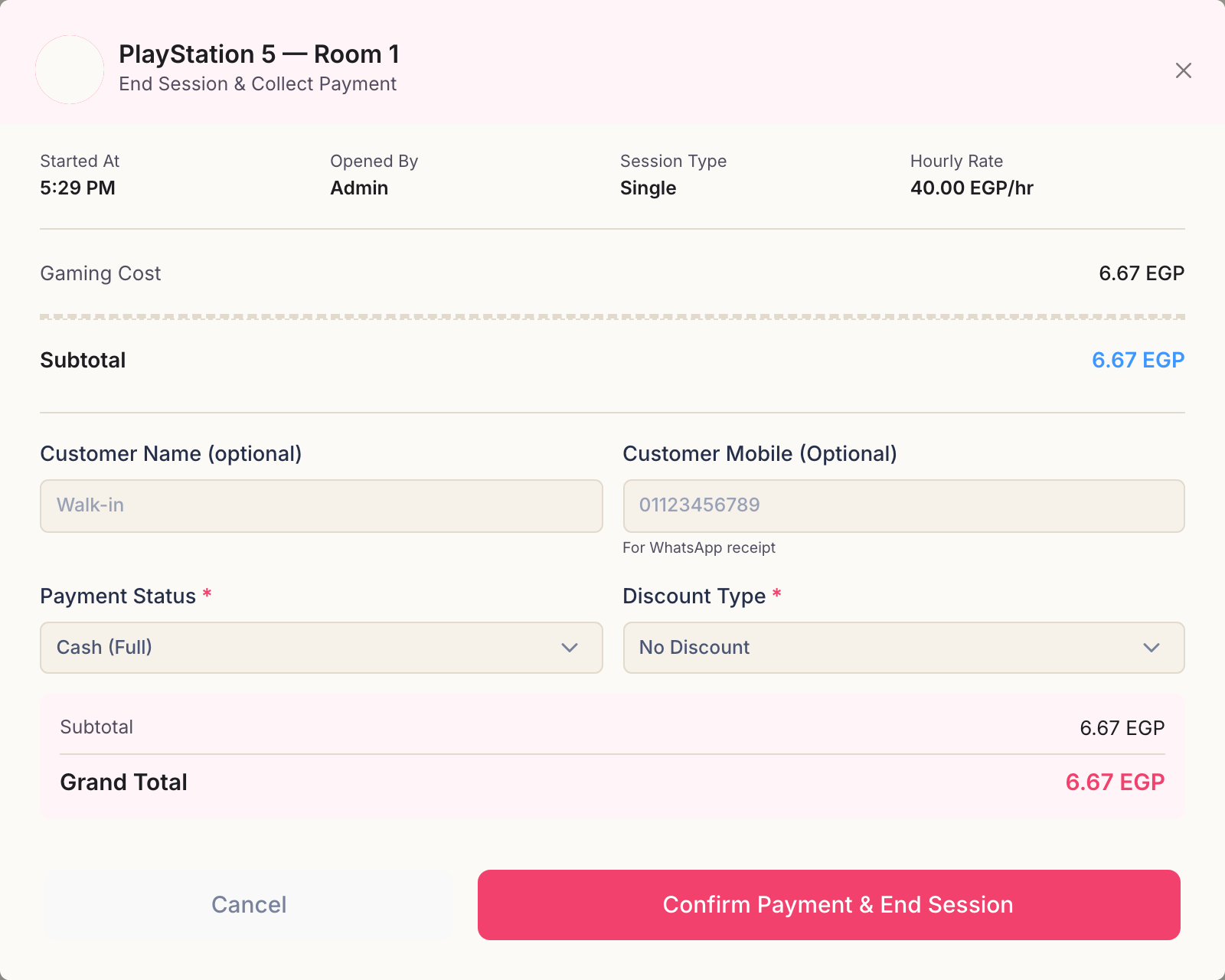
The panel that opens is the whole transaction on one screen. Across the top: when the session started, who opened it, whether it was single or multi, and the rate it was charged at. Below that, the money.
- Gaming Cost — the playing time at that rate.
- Products Total — anything added from the products panel, if there was any.
- Subtotal — the two added together, before any discount.
Take the customer's details
Customer Name and Customer Mobile are both optional — leave them empty for a walk-in and the sale is simply recorded without a name.
Filling them in files the session under that customer, so their visits and hours build up in the customer directory over time. If the number is already known, Rank marks it as an Existing customer as you type.
Record the payment
Payment Status is how the money actually arrived:
- Cash (Full) — paid in full, in cash. The usual case.
- InstaPay (Full) — paid in full by bank transfer.
- Digital Wallet (Full) — paid in full from a mobile wallet.
- Unpaid — the customer has not paid. The session closes and the amount stays owed.
- Partially Paid — they paid some of it. Rank asks how much and by which method, and records the rest as outstanding.
Say what really happened. The payment method decides which drawer the money is counted in at the end of the shift: recording an InstaPay transfer as cash leaves the employee short when they count the drawer.
Giving a discount
Discount Type starts at No Discount. The other two:
- Fixed Amount — take a number of pounds off the bill.
- Percentage (%) — take a percentage off.
Either way the amount appears on its own line and the grand total updates before you confirm, so you can see exactly what you are giving away.
Confirm
Press Confirm Payment & End Session. Rank closes the session, releases the machine, and confirms with a summary of the device, the duration and the times it ran between.
The stock for anything the customer ate or drank has already come off; the money now belongs to the open shift.
Afterwards
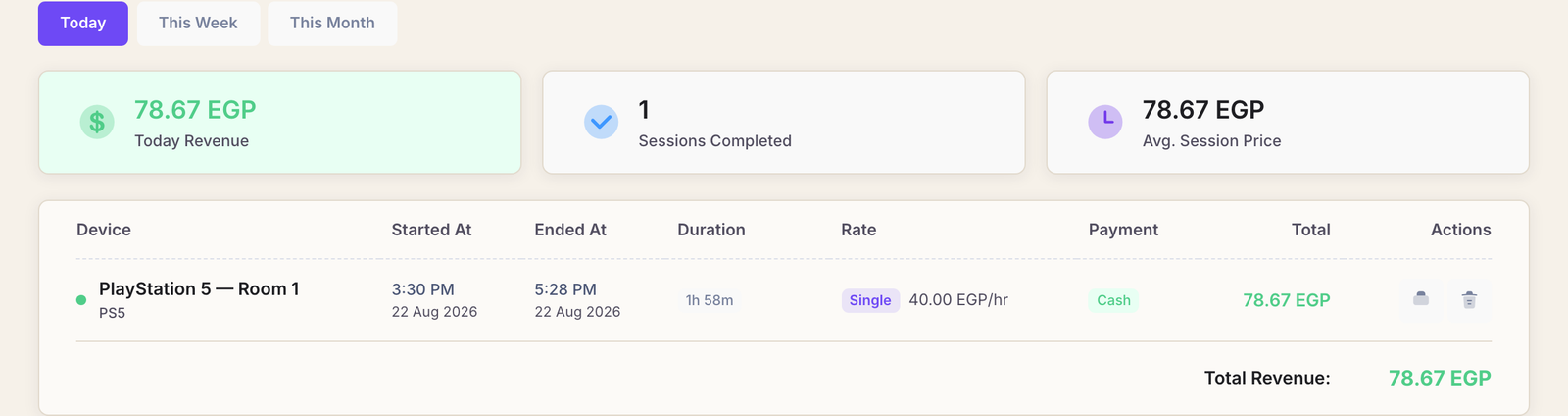
Finished sessions move to Completed Sessions in the menu. Filter by today, this week or this month, and the page totals what you took, how many sessions it took to get there and the average price of one.
Common questions
I ended the session by mistake. Can I undo it?
No — a finished session is a financial record, and Rank will not quietly rewrite one. Start a new session for the customer and, if the first one has to disappear from the books, ask the owner: voiding a completed session is theirs alone to do.
The customer wants a printed receipt.
Completed sessions carry an invoice you can print from the row's actions, provided your account has permission to print customer invoices.
How was the total worked out?
Playing time at the machine's rate — single or multi, whichever the session ran as — plus anything added from products, minus any discount. Part-minutes count as whole minutes, and paused time is not counted at all.
A By Game session ignores time entirely: it is the number of matches times the machine's per-game price.
Can I end a session that somebody else started?
Yes, if your account has permission to end sessions. Rank keeps a record of who opened it and who closed it, and both appear in the shift reports.