
Keeping stock straight
See what is running out, add a delivery, and correct a miscount.
Where the numbers live
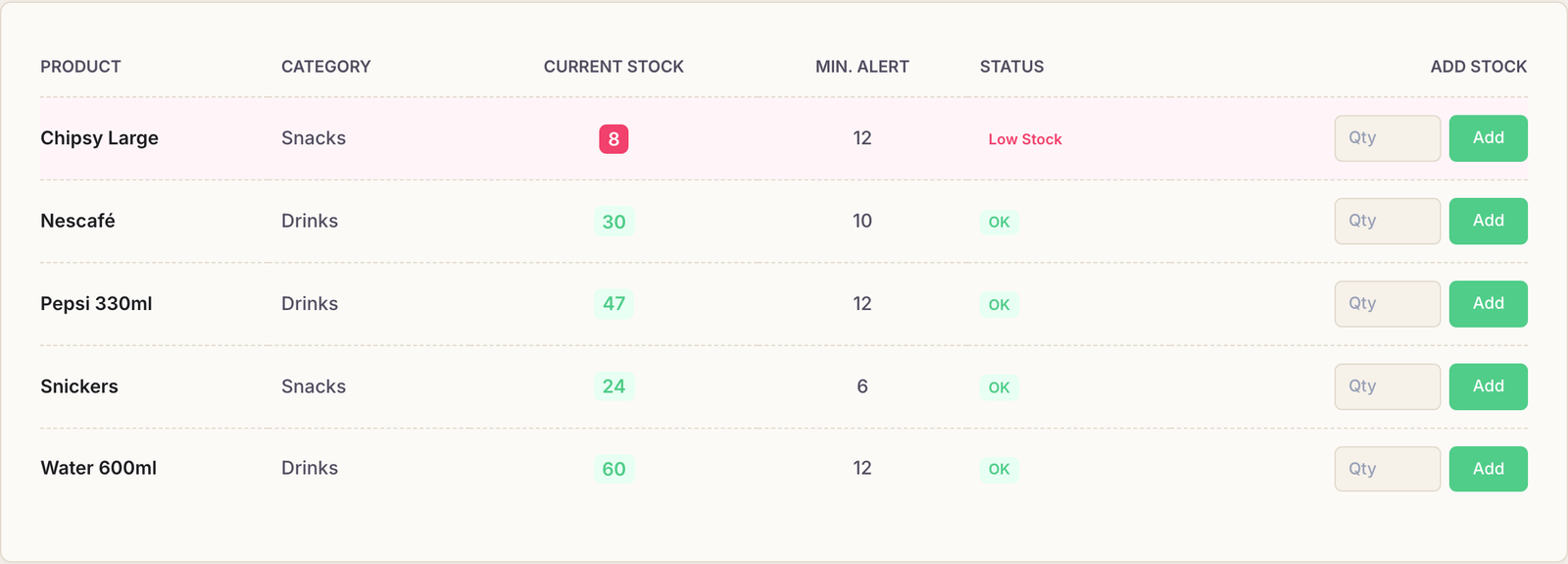
Inventory → Stock Levels is the shelf, as Rank believes it to be. One row per active product, with what is left, the level you asked to be warned at, and whether it has fallen below it.
Rank counts down on its own. A product leaves your stock when it is:
- sold at the till, or
- added to a running session from the Products panel.
You never have to subtract anything by hand for a normal sale.
Recording a delivery
When the supplier arrives, find the row, type the number of new units into the box at the end of it and press Add. The count goes up immediately.
Add the delivery here rather than editing the product. Adding stock records a movement — this many arrived, on this day, from this person. Editing the number on the product form just overwrites it, and next month there is no way to tell a delivery from a typo.
The low-stock list
Low Stock — from the button at the top of Stock Levels, or its own entry in the menu — shows only what has fallen under its minimum. That short list is your shopping list.

The same warning follows the product around: a Low badge appears beside it in the session products panel and at the till, so whoever is selling can see it without opening a report.
When the count is wrong
Stock drifts. Something breaks, something is drunk by staff, something was never entered. When the shelf and the screen disagree, adjust the product to the number you physically counted rather than inventing a delivery to paper over the gap.
An adjustment is recorded as an adjustment, which means the difference between “we bought less than we thought” and “things are disappearing” stays visible.
Common questions
Stock went down and nobody sold anything.
Something was almost certainly added to a session rather than sold at the till — the two draw on the same shelf. Check the sessions that ran around that time.
Do the branches share stock?
No. Stock is counted per branch, which is the only way the numbers can mean anything with two shops — a crate moved between them has to leave one count and join the other.
A product is missing from Stock Levels.
The page lists active products only. Anything set to Inactive is hidden here, on the till and in the session panel.